Five ways to organize your tasks (and actually stay on top of them)
There's something deeply satisfying about having all your tasks neatly organized—knowing exactly what needs to be done, what's in progress, and what can finally be ticked off. But here's the thing: the way we organize tasks can look completely different from one person to another.
Some of us love writing everything down in tidy lists, others need to see their work laid out visually, and some prefer assigning time slots to every single activity. There's no “right” way to organize your day—only the one that fits the way your brain works.
Let's explore some of the most popular ways to manage tasks—and how you can use them to stay on top of your day, your week, and your long-term goals.
1. The classic: lists that keep things simple
If you're someone who finds joy in crossing items off a list, you're not alone. Lists are the most straightforward way to manage your tasks and can be highly effective.
The beauty of lists lies in their simplicity. You don't need to overthink categories or visuals—just write, sort, and check things off. For people who feel easily overwhelmed by too many moving parts, lists can offer calm and structure.
They're perfect for brain dumps, daily to-dos, or priority sorting. You can keep a running list of everything on your plate, or break it down into smaller ones.
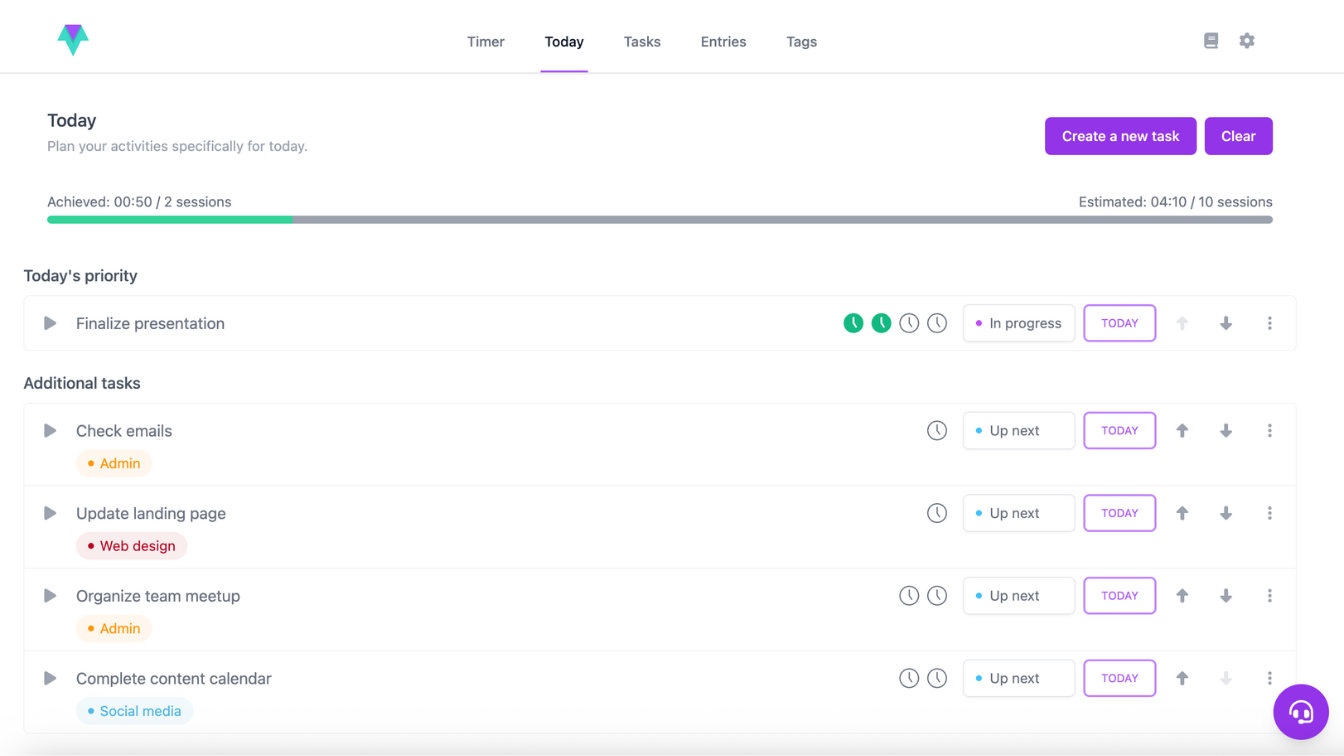
In Time Stream, we've built on this idea with two simple yet powerful lists: the Task list and the Today list.
Your Task list is where everything begins—a single place to capture all your thoughts, plans, and to-dos. Think of it as your master list, where every task (big or small) lives until you're ready to act on it. It keeps everything safely out of your head and in one organized spot, so you can stop worrying about forgetting something. Whether it's work projects, errands, or future ideas, the Task list is your system of record.
Then there is your Today list, your space for daily focus. It's where you pull in the few tasks that truly matter right now—the ones you're committed to completing today. This separation between everything you could do and what you'll actually do is key to avoiding overwhelm. It creates a rhythm: plan, prioritize, and focus. You can look at your Task list in the morning, choose what's realistic, and move it to Today. At the end of the day, you'll have a clear sense of progress—not just a longer to-do list.
Stay focused on today’s goals and avoid overwhelm.
Perfect for: anyone who wants clarity, structure, and focus; those who feel overwhelmed by too many tasks; or anyone who likes the satisfaction of checking off progress each day.
2. The visual approach: board view
If you prefer seeing your work move from “to-do” to “done,” a board view might be your productivity sweet spot.
This method, also known as a Kanban board, organizes your tasks into columns that represent different stages—for example, To Do, In Progress, and Done. Each task becomes a card you can move between columns as you make progress.
Boards give you a visual sense of momentum. It's not just about finishing tasks—it's about watching your work flow. That movement can be surprisingly motivating, especially when you're working on projects with many steps or collaborating with others.
You can also tailor boards to match your workflow. For instance, a freelancer might use columns like Ideas, Pitch Sent, In Review, and Published. A student could have Assignments, Studying, and Submitted. The key is to make the stages meaningful for you.
Perfect for: visual thinkers, project managers, or anyone who loves seeing movement and progress.
3. The planner's favorite: calendar view
Some people like to see their time, not just their tasks. That's where the calendar view comes in.
Here, you can schedule tasks into specific time slots and structure your day intentionally—no more guessing how long something will take or overloading your to-do list. You can even use time boxing, a technique where you dedicate fixed time blocks to a single task, helping you stay focused on it.
The benefit of a calendar view is that it transforms vague intentions into clear commitments. You stop telling yourself “I'll do it later” because you've already decided when. It's also an excellent way to visualize balance—seeing your week mapped out can reveal where you've overcommitted or when you can afford to take a break.
This view is especially helpful for those who juggle meetings, deadlines, or client work. Instead of a long list of tasks, your calendar gives you a sense of control over your time.
Perfect for: planners, routine-lovers, and anyone who thrives on structure and time awareness.
4. The big-picture view: timeline
If your work involves multi-step projects or long-term goals, a timeline view helps you zoom out and see how everything fits together.
Think of it as a roadmap of your progress—each task is part of a sequence, showing dependencies, overlaps, and deadlines. It's particularly useful when managing campaigns, events, or creative projects, where understanding how one task affects another can save you a lot of stress later on.
The timeline view gives structure to complexity. It helps you notice patterns, anticipate busy periods, and plan your time more strategically. You can see not just what needs to be done, but when—and how shifting one thing impacts the rest.
Perfect for: teams, planners, or anyone managing multiple moving parts at once.
5. The flexible layer: tags and statuses
Sometimes, the best way to organize your tasks isn't just about layout—it's about how you categorize them. That's where tags and statuses come in.
Tags let you personalize your system however you like:
A student might tag tasks by subject or type of work (e.g., “Math,” “Essay,” “Reading”).
A freelancer could tag by client, project, or type of work (e.g., “Client A,” “Design,” “Invoice”).
A creative professional might tag by phase of a project or type of task (e.g., “Brainstorming,” “Editing,” “Publishing”).
A busy parent could use tags for home, errands, or personal goals (e.g., “Groceries,” “Appointments,” “Family Time”).
Beyond these examples, tags give you the ability to add context and group related tasks together. They make it easy to scan your list and instantly know what each task relates to. Tags can also serve as reminders for recurring themes or types of work, helping you maintain consistency and focus across different projects or areas of life.
Once your tasks are organized with tags, you can use statuses to track their progress and see exactly where everything stands. In Time Stream, you can create labels that match your workflow—like “Not Started,” “In Progress,” “Waiting,” or any custom status that reflects the way you work. This flexibility ensures your system is truly yours while giving a clear overview of what's happening at a glance.
Used together, tags and statuses turn your task list into a smart, adaptable system. You can quickly spot high-priority work, keep track of progress, and see what's already in motion—all without overcomplicating your workflow.
Finding what works for you
The truth is, productivity looks different for everyone. Some people thrive with simple lists, while others prefer routines, schedules, or visual cues to guide their day.
The key is recognizing your own style and adapting your approach to fit it. What works for someone else might not work for you—and that's perfectly fine. Your system should support how you naturally think and work, not force you into a one-size-fits-all method.
Productivity isn't about being perfect or doing everything. It's about finding the rhythm that makes sense for you—where your approach helps you feel focused and organized rather than stressed or overwhelmed.
Master your workflow with Time Stream and start your 14-day free trial today.
More from the blog
Find your flow, take your productivity to the next level.
In today’s fast-paced world, productivity is more important than ever. Yet, staying productive isn’t always easy. With the correct tools, staying on track becomes easier. Read on to find out how Time Stream will help you overcome five productivity challenges.
Ever get so immersed in a task that time flies, and you forget to even check your phone? That’s productivity flow—a powerful state of deep focus that can boost your output by up to 500%. In this blog, we’ll explore what flow really is, why it matters, and how you can tap into it more often to work smarter, not harder.
Being productive is a goal many of us chase. But sometimes, the advice we follow is actually doing more harm than good. From hustle culture to multitasking, it’s easy to fall for myths that feel productive but lead to burnout and distraction. In this blog, we’re busting seven productivity misconceptions and showing you what to do instead.
|
6 min
Find your flow. Start using Time Stream today.
The only productivity app that protects your time and privacy. Focus better, accomplish more.