New in Time Stream: allocate a timer type to your tasks
If you’ve ever wished your productivity app could adapt to the way you actually work—not the other way around—you’re going to love this update.
At Time Stream, we’re all about helping you find focus and flow. Our goal is to make time management feel effortless—so you can spend less time planning and more time doing.
That’s why we’ve just added a new feature that gives you more control over how you manage your sessions: you can now allocate timer types directly to your tasks.
A feature that fits your workflow
Every task requires a different kind of energy. Some need deep concentration and structure, while others thrive on creative freedom and uninterrupted flow.
Now, with Time Stream’s new timer allocation feature, you can choose between the Pomodoro timer for structured focus or the Infinity timer for when you’re in the zone—for each task you create. Once you set your preference, all you have to do is hit play. The right timer starts automatically, perfectly aligned with your task and mindset.
Until now, switching between timers meant a few small extra steps. And while that might not sound like much, those micro-decisions can add up—especially on busy days.
By assigning timers to your tasks upfront, you can:
Reduce friction when starting work
Build consistency into your workflow
Match your energy to your task type
Keep your focus uninterrupted from the moment you begin
This update makes your time tracking smarter—not by adding complexity, but by letting you work with more intention.
The Pomodoro timer: focus with structure
The Pomodoro Technique® is a timeless productivity method that breaks work into focused sessions (traditionally 25 minutes) followed by short breaks, with a longer break typically taken after every four cycles.
It’s designed to sharpen your attention and prevent burnout—making it perfect for tasks that need sustained mental effort.
Try it for:
Writing, studying, or coding
Large tasks that need to be broken into manageable subtasks
Short tasks that require intense focus
Each session gives you a burst of momentum, while the built-in breaks help you recharge. It’s a great way to turn big, intimidating tasks into manageable steps.
Pro tip: Use the Pomodoro timer when starting something you’ve been putting off. The defined start and stop times make it easier to begin—and even easier to keep going.
Infinity timer: flow without limits
Some tasks require uninterrupted focus, and the Infinity timer lets you track your time without any breaks or interruptions.
It runs continuously until you stop it, giving you the flexibility to work as long (or as little) as you like.
Try it for:
Creative projects like editing, design, or art where you want uninterrupted flow
Collaborative work, meetings, or brainstorming sessions
Ongoing admin, research, or maintenance tasks that don’t fit neatly into short time blocks
It’s ideal for people who work intuitively, letting their focus guide their workflow. With the Infinity timer, you’re in full control of your pace. Time Stream simply keeps track, quietly in the background.
How to allocate timers to your tasks
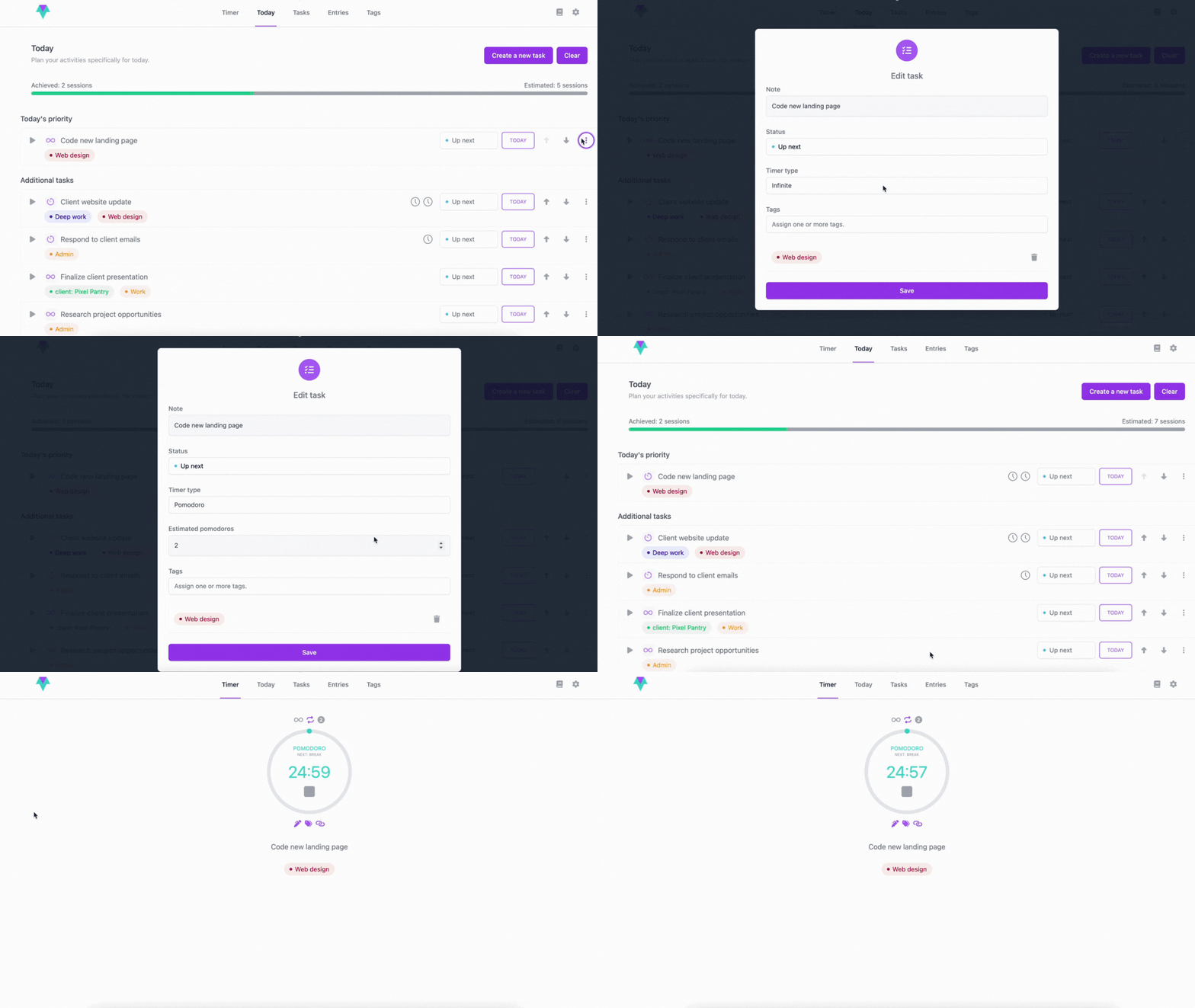
When creating or editing a task in Time Stream’s Today view, you’ll now see an option to select your preferred timer type. Choose between Pomodoro or Infinity. When you hit play, your selected timer will start automatically.
You can change it at any time during the day if you feel a different timer fits the task better.
Easily allocate your preferred timer type.
Try it today
Next time you open Time Stream, assign timers to a few of your tasks. Mix it up. See what feels best for you.
Whether you’re tackling deep-focus work with Pomodoro sessions or letting your creativity flow with the Infinity timer, you’ll notice how much smoother and more intentional your day can become.
Because at the end of the day, productivity isn’t about doing more—it’s about working your way.
If you’re ready to accomplish more and stress less, it all starts with building the right habits! With the right mindset and tools, it becomes totally achievable. Our new Time Stream blog is your space for practical strategies, actionable tips, and expert insights to help you unlock your productivity potential.
In today’s fast-paced world, productivity is more important than ever. Yet, staying productive isn’t always easy. With the correct tools, staying on track becomes easier. Read on to find out how Time Stream will help you overcome five productivity challenges.
Ever get so immersed in a task that time flies, and you forget to even check your phone? That’s productivity flow—a powerful state of deep focus that can boost your output by up to 500%. In this blog, we’ll explore what flow really is, why it matters, and how you can tap into it more often to work smarter, not harder.
|
5 min
Find your flow. Start using Time Stream today.
The only productivity app that protects your time and privacy. Focus better, accomplish more.